


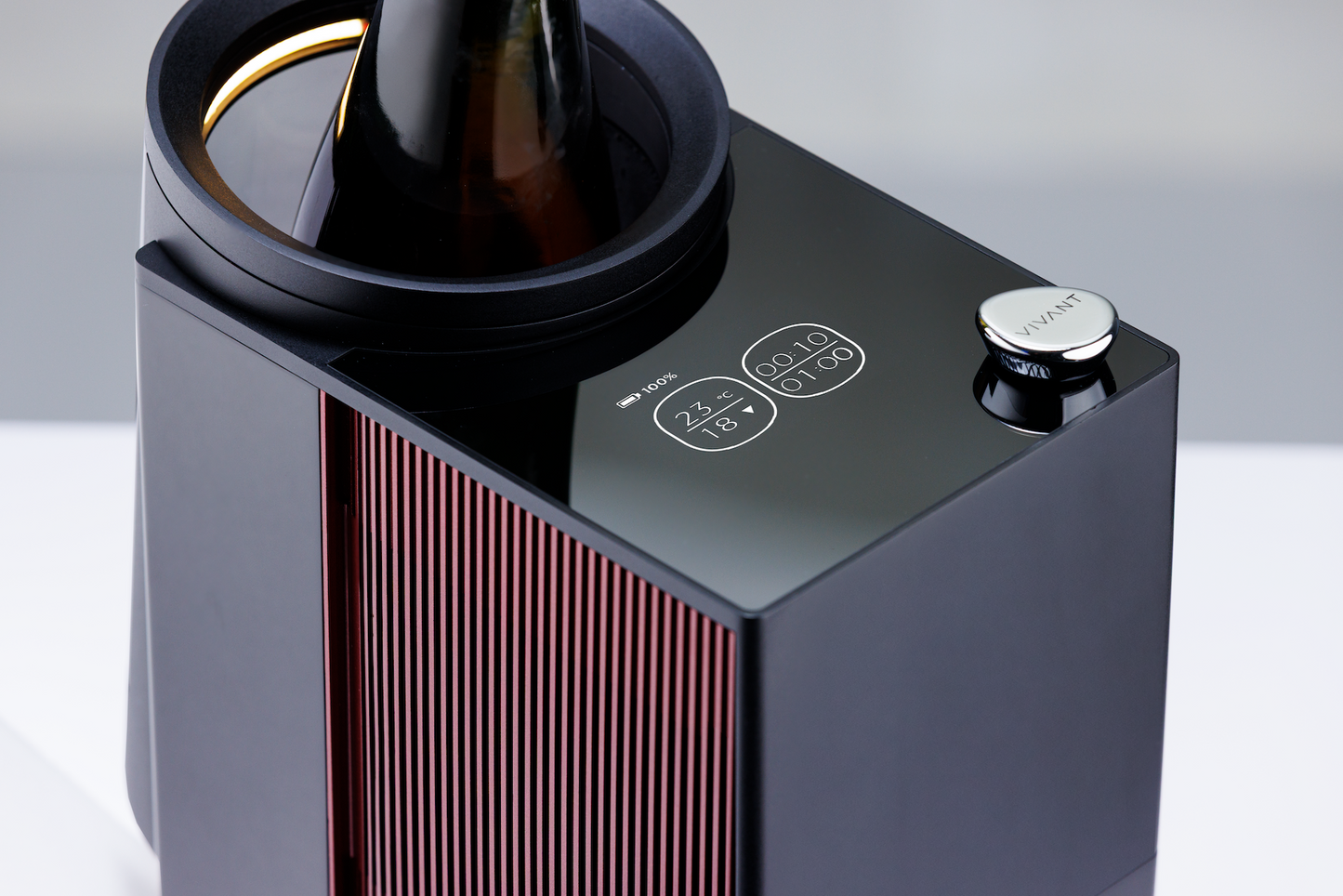
Precisione assoluta, grado per grado.
Raffreddamento a semiconduttori e intervallo di temperatura da 8°C a 20°C. La tecnologia del microchip e del sensore IR offre una precisione impeccabile, per una degustazione superiore.

Autonomia senza compromessi.
Una batteria ricaricabile e rimovibile da 18V garantisce fino a 4 ore di autonomia senza fili. Libertà totale di posizionamento, ovunque desideri servire il vino.

Massima precisione. Senza interruzioni.
Il doppio sistema di raffreddamento a semiconduttori blocca la temperatura desiderata entro ±1°C: il terroir è preservato, dal primo all'ultimo calice.

Il tuo messaggio, in primo piano.
Personalizza il display di Venus G2 con un messaggio dedicato, impostabile istantaneamente tramite l’app. Un tocco distintivo per regali, hospitality ed eventi speciali.

Il tuo sommelier personale, sempre con te.
Connetti Venus G2 all’app VIVANT via Bluetooth. Scansiona l’etichetta di qualsiasi vino: vitigno, regione, annata e temperatura di servizio consigliata si sincronizzeranno istantaneamente sul tuo TITAN con un semplice tocco.

Creato per i momenti che contano.
Precisione nella degustazione: che si tratti di una cena o di un momento di relax, Venus G2 assicura la temperatura ideale.

Ogni vino alla sua temperatura ideale.

Il tuo sommelier di fiducia.

In terrazza, in barca, in una sala privata.
Your personal AI sommelier.
Scan any wine label to instantly reveal grape, region, vintage, and the ideal serving temperature — then ask your AI sommelier anything, from food pairings to tasting notes to similar-wine picks. Expert answers in seconds.
From your phone, set the exact serving temperature — tailored to each bottle.
One tap syncs your target to Venus G2 via Bluetooth. Semiconductor precision holds the temperature steady — first pour to last.


Temperature matters
Serve at Precision
Simple and effective
Questions
Frequently Asked Questions.
-
An electronic wine chiller uses thermoelectric (Peltier) cooling controlled by a sophisticated microchip and IR sensor. VENUS G2 detects your bottle's actual temperature in real time, drives the cooling element precisely to your target, and holds it within ±1°C across an 8°C–20°C range — far more accurate than ice buckets or passive coolers.
-
Up to 2.5–4 hours of continuous cooling, depending on ambient temperature and your target. The rechargeable, removable 18V 5,500mAh cell is UN38.3 certified — swap in a fresh one for uninterrupted service.
-
All of them. 8–20°C covers champagne (8–10°C), whites (10–13°C), rosés (10–12°C), and structured reds (16–18°C). The VIVANT Wine App recommends the exact setpoint for every label.
-
No. VENUS G2 works fully standalone — set the temperature directly on the device. The app adds label scanning, AI sommelier guidance, remote control, and custom display. Optional, not required.
-
Yes. The battery is UN38.3 certified — the international standard for lithium-ion transport — and accepted in carry-on on most major airlines. Check your carrier before you fly.
-
24 months on the main unit against defects in materials and workmanship. Register your product online for a +12-month extended warranty. Accessories (cables, manuals) not covered.
-
A traditional ice bucket cools by submerging the bottle in melting ice — temperatures fluctuate, labels get wet, and there's no way to hold a precise serving temperature. VENUS G2 uses active semiconductor cooling controlled by a sophisticated microchip and IR sensor — locking your bottle to a precise temperature (8°C–20°C) and holding it within ±1°C, ice-free.
-
The best portable wine chillers combine three things: active cooling (not just insulation), cordless operation, and precise temperature control. VENUS G2 delivers all three — semiconductor cooling, a UN38.3-certified rechargeable battery (2.5–4 hours), and IR-sensor precision across 8°C–20°C.
-
Most red wines are best between 12–18°C (54–64°F). Bigger reds like Cabernet Sauvignon and Syrah at 16–18°C; lighter reds like Pinot Noir at 12–14°C. Whites are best at 8–12°C (46–54°F) — crisp Sauvignon Blanc and Riesling cooler, oaked Chardonnay slightly warmer. VENUS G2's full range covers 8°C–20°C, with the VIVANT Wine App suggesting the exact setpoint for every label.
YOUR Venus G2
In the Box + User Guide
Get started with your VENUS G2 using our step-by-step guide for optimal performance.
-
- 01 VENUS G2 Main Unit × 1
- 02 Charging Unit & Cable × 1
- 03 Rechargeable Lithium-ion Battery × 1
- 04 Charging Dock × 1
- 05 International Warranty Card × 1
- 06 User Guide QR code × 1
-

Dock Charging
Plug the power adapter into the charging dock, then place the rechargeable, removable lithium-ion battery onto the dock. The indicator light switches from red to green once charging is complete.

In-Unit Charging
Insert the battery into the main unit, then connect the power adapter. The device must stay powered off during charging — the display will show the real-time charging percentage.
-
-
01
Scan & get a recommendation
Open the VIVANT Wine App, then scan the label or ask the AI Sommelier for the recommended serving temperature.
-
02
Insert the bottle
Take the wine from your cellar or refrigerator and place it in the Venus G2 chamber.
-
03
Power on
Press and hold the control knob for 2 seconds to start Venus G2.
-
04
Connect via Bluetooth
In the app, connect to Venus G2 via Bluetooth.
-
05
Send to device
Tap “Send to Device” to sync the recommended temperature in one tap.
-
06
Let Venus G2 take over
Venus G2 holds a steady temperature throughout; a gentle chime sounds when the timer completes. (Tip: adjust the in-chamber light bar from the app so the label stays easy to read.)
-
01
Prepare the Wine
Take the wine from your cellar or refrigerator and place it in the Venus G2 chamber, resting against the cooling plate at the back.
-
02
Power on
Press and hold the control knob for 2 seconds. The welcome screen appears, then the home screen.
-
03
Set the temperature
Short press; the temperature flashes. Rotate clockwise to raise, counterclockwise to lower. Range 8–20°C (46–68°F).
-
04
Set the decanting time (if needed)
Short press again; the timer flashes. Rotate to set the duration in 10-minute steps, up to 8 hours.
-
05
Other settings (optional)
Short press to cycle light bar brightness, audio, and °C/°F; rotate to adjust.
-
06
Confirm & Start
After about 5 seconds the screen returns home and Venus G2 holds your set temperature; a gentle chime sounds when the timer completes.
-
07
Power off
Hold the knob for 2 seconds until the logo appears; wait until the device fully stops before removing the battery or unplugging.
-
01
-
-
 Press 2s
Power On & Off
Press and hold the control knob for 2 seconds to turn Venus G2 on or off. The logo appears on both startup and shutdown — once the screen goes dark, please wait a moment until the device has completely stopped before removing the battery or unplugging the power cable.
-
 Other Settings
Live IR-detected Temperature
Set Target Temperature
Other Settings
Live IR-detected Temperature
Set Target Temperature
Display Screen
Top status bar (left to right): battery level, Bluetooth (shown when the device is connected to the VIVANT Wine App via Bluetooth), and Other Settings (gear icon).Left area: top — live IR-detected temperature; bottom — set target temperature.
-
Elapsed Decanting Time
Set Decanting Time
Home Screen
Right area: top — elapsed decanting time; bottom — set decanting time.
-
 Light Bar Brightness
Chime
Temperature Unit
Light Bar Brightness
Chime
Temperature Unit
Other Settings
From the home screen, a third short press opens the Other Settings screen. From left to right: light bar brightness, chime, and temperature unit.
-
 Setting Time & Target Reached
Completion Alerts
When the target temperature is reached, the white ring on the left turns blue. When the decanting time is reached, the device sounds a chime (the chime can be turned off in the VIVANT Wine App). As a safety measure, Venus G2 automatically powers off 8 hours after the last operation.
-

Error Alerts
ERROR 1: battery abnormal or faulty.
ERROR 2: IR sensor abnormal or faulty.
ERROR 3: fan abnormal or faulty.
Scan the QR code for troubleshooting steps or to contact support.
-
-
First Use & Long-Term Storage — Before first use or after a long period of inactivity, insert the battery into the unit (powered off) or place it on the charging dock. Charge for 3–4 hours until fully charged.Battery Care — Recharge after every use to extend battery life.Heat Dissipation — Leave sufficient space around the device during operation.Bottle Placement —For optimal cooling performance, ensure the bottle sits fully and securely in the chamber.Approved Accessories Only — The rechargeable, removable lithium-ion battery is custom-designed for VIVANT. Use only approved chargers and do not attempt to disassemble the battery.Auto Power-Off — For safety, VENUS G2 automatically shuts down 8 hours after the last operation.Avoid High Heat — Do not place the device in high-temperature environments such as dishwashers, microwaves, or ovens.Adult Supervision — Intended for individuals with sufficient knowledge and experience, or under appropriate supervision. Keep out of reach of children to prevent unintended operation.


-
24-Month Warranty
-
14-Day Quality Guarantee
-
Worldwide Shipping